
This is how PictureCore Basic works: Three simple steps to perfection
We have distilled the entire complex AI process into three logical steps where you have full control without needing to be an expert:
- Step 1 – Describe: You start by briefly describing the core of your image.
- Step 2 – Click: You select the properties and details you want using our smart click lists.
- Step 3 – Copy: You copy the finished ACC code with one click, without even having to touch or edit the text yourself.
By working this way, you avoid spelling errors and technical mistakes, making the entire system more stable than ever. It's precision meeting creativity, directly in Excel.
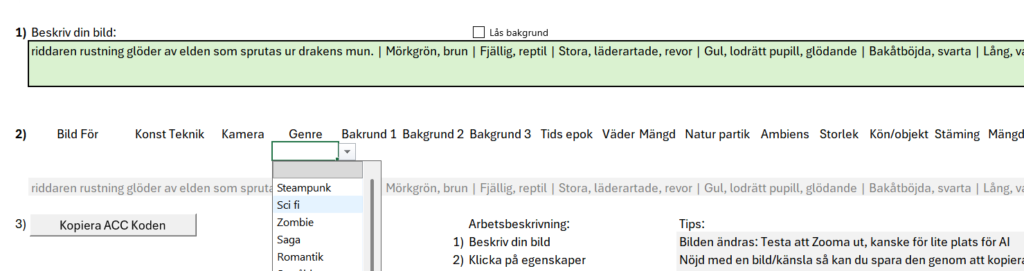

The ACC Code: Your Bridge to AI
Your choices in the spreadsheet produce different outcomes, and Excel weaves them together into a single cohesive ACC code. This code is optimized to give the AI maximum understanding of both subject and atmosphere. You simply need to copy and paste it. ACC code.. This code is optimized to give the AI maximum understanding of both subject matter and atmosphere. You simply need to copy and paste it.
Example of a generated ACC code:
ACC Code: The knight's armor glows with the fire spewing from the dragon's mouth. | Dark green, brown | Scaly, reptile | Large, leathery, torn | Yellow, vertical pupil, glowing | Backward-curving, black | Long, sharp, spiky | Sharp, extended | Shiny, dark | Flames (red/orange) | Hungry
Excel: The Master of Reuse
The fact that you can save your creations makes Excel the ultimate database for your creative work. You can store thousands of ACC-koder codes locally on your computer, ready to be copied and reused at any time. Below you can see how we have structured the database.

A pro tip: You don't need to reuse the entire code every time. Mix and match instead! Save that specific dragon you managed to perfect, or that fantastic lighting setup that gave the image the perfect mood. By picking the best parts from your previous masterpieces, you can create entirely new visions with proven quality.
Plan Your Series: From Image to Story
With PictureCore, we don't stop at single images. In our planning module, you can direct entire sequences scene by scene. By keeping track of the plot and the status of each image, you ensure that your story holds together all the way through.

Why Planning in Excel Is the Key:
Problem Solving: If a scene gets a 'Problem' status, you have your ACC code saved and can easily make small adjustments until it's perfect.
Overview: See at a glance which scenes are complete and where you need to make adjustments (e.g., during a 'lighting change').
Logical Flow: By writing down the action for Scene 1, 2, and 3 before you start generating, you help the AI (and yourself) maintain the thread.